Building OpenHarness: Every Part of the Agent Harness, Yours
What if you could compile your own agent harness?
In the last post I built harness-api: one opinionated coding agent behind an OpenAI-compatible endpoint. Every decision in it was mine: the tools, the context strategy, the guards, the loop. That’s fine for a coding agent. But each time someone asked for a variation (“can it remember things across chats?”, “can it call our internal API?”, “can it check its own answer first?”), the answer was the same: fork it and change the Go.
In August, DeepSeek open-sourced its agent harness built on a single idea: everything is a plugin. The model adapter, the tool registry, the session log, the agent loop itself: all of them are replaceable from configuration. Reading it raised the obvious next question. If every part of a harness can be swapped, why does assembling one still require writing code?
So I built OpenHarness: a web app where you walk through every component of a harness, change whatever you want, chat with the result, and download it as one binary for macOS, Linux or Windows that serves an OpenAI-compatible API. Optionally, you also get a Dockerfile to run it in a container.
It’s about 5,700 lines of Go with no third-party dependencies, 3,200 lines of hand-written HTML/CSS/JS with no build step, and 1,800 lines of Python test fixtures. The interesting parts were:
- deciding what a “component” actually is
- turning a JSON document into a native executable in about a second
- letting strangers run agents on my server without handing them my server
Getting started
- App: openharness.prakhargurunani.com
- Source: github.com/FirePing32/OpenHarness, MIT licensed
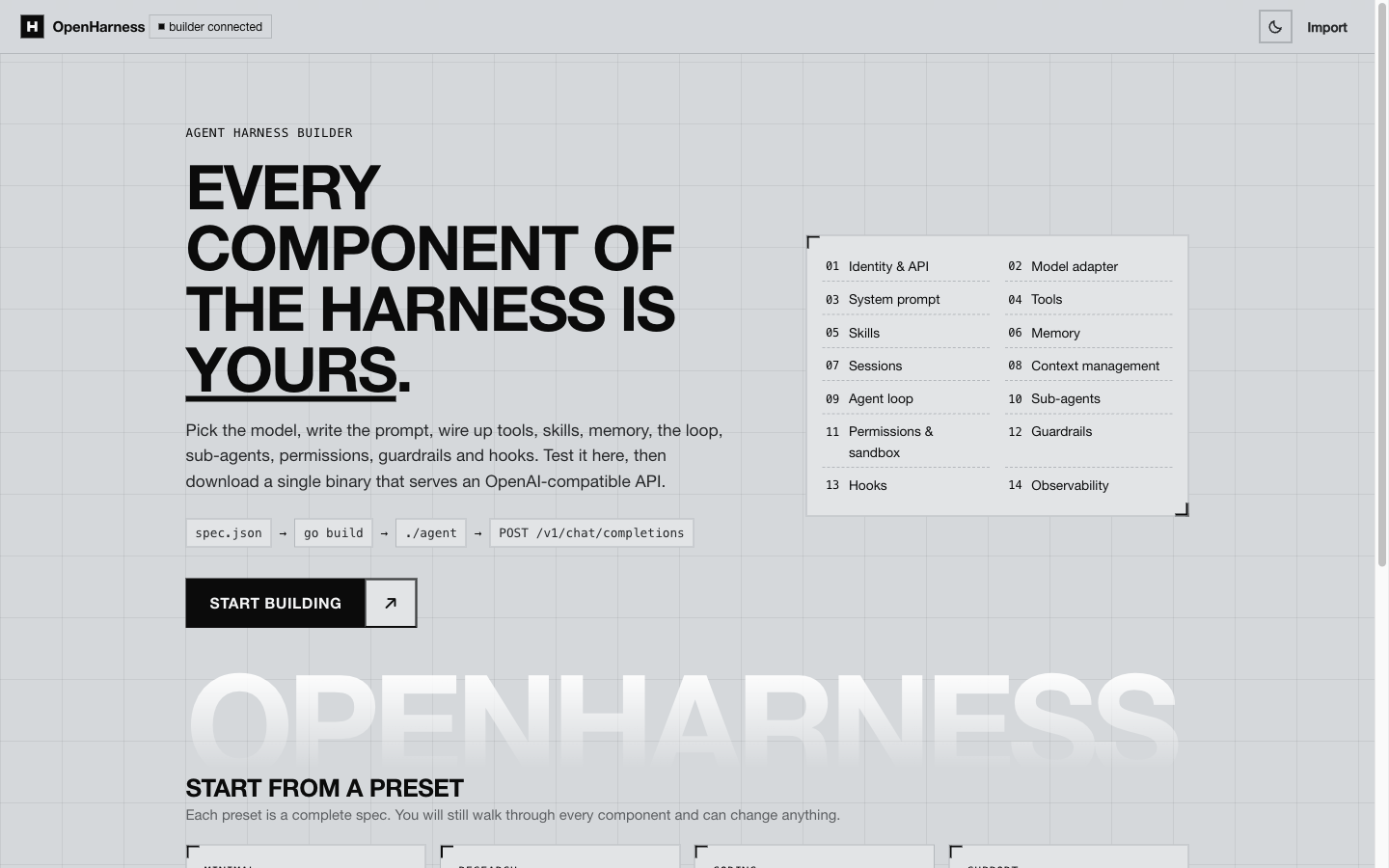
Pick a preset (Minimal, Research assistant, Coding agent, Support agent), walk through the 14 component steps, test it on the Test step with your own model key, then pick your OS on Build & download. Run what you get:
chmod +x ./research-agent-darwin-arm64
export DEEPSEEK_API_KEY=sk-...
./research-agent-darwin-arm64
And talk to it with the SDK you already have:
from openai import OpenAI

client = OpenAI(base_url="http://127.0.0.1:8080/v1", api_key="unused")
resp = client.chat.completions.create(
    model="research-agent",
    messages=[{"role": "user", "content": "What changed in Go 1.26?"}],
)
print(resp.choices[0].message.content)
The client sends one request. Inside, the agent may plan, call a dozen tools, delegate to a sub-agent and check its own answer before replying.
The shape of the system
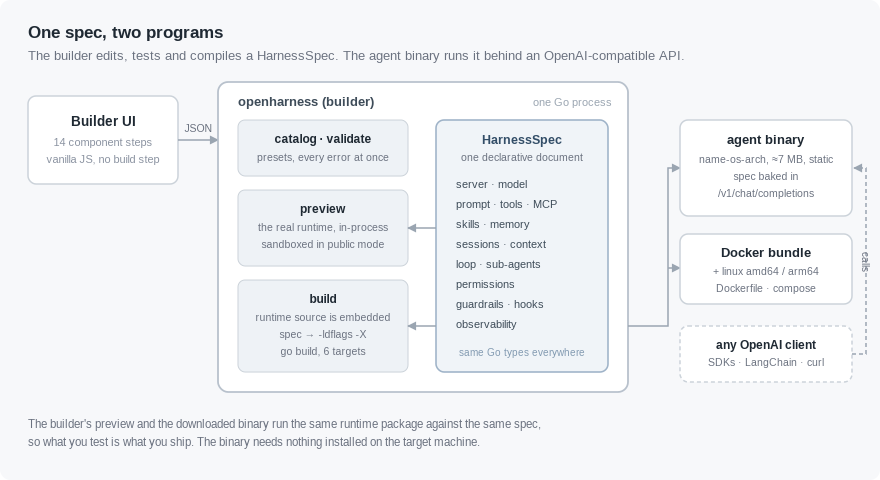
There are two programs and one document. The builder is a Go server with an
embedded UI. It edits, tests and compiles a HarnessSpec. The agent binary
runs that spec. Both use the same runtime package, so the agent you chat with
in the browser is the one you download.
What is a harness, exactly?
LangChain’s definition is the cleanest I’ve found: the harness is every piece of code, configuration and execution logic that isn’t the model itself. That is true, but it isn’t a list you can build a UI from.
DeepSeek Harness gives a better starting point. It’s built on a small kernel
called Cordis, where plugins contribute services, typed events and reversible
effects to a shared context. Each capability is a seam with three roles: an
interface (ctx.llm), one or more providers (llm-deepseek), and consumers. The
community whitepaper counts 26 seams, 52 built-in tools and 44 session event
types.
Not all of those make sense for an agent that lives behind an HTTP API. A web UI seam, an LSP client or a terminal multiplexer don’t. After mapping every seam, I ended up with 14 components, each of which became one step in the builder:
| Component | DeepSeek seam | What you can change |
|---|---|---|
| Identity & API | ctx.webServer | name, port, model id, bearer auth, CORS |
| Model adapter | ctx.llm | provider, sampling, retries, fallback chain |
| System prompt | ctx.systemPrompt | sections, date, tool summary, client policy |
| Tools | ctx.tools, ctx.mcpManager | built-ins, HTTP tools, MCP servers, truncation |
| Skills | ctx.skills | progressive or eager loading |
| Memory | ctx.storage | static notes, persistent store, per-user scope |
| Sessions | ctx.sessions | stateless, or server-side JSONL history |
| Context | ctx.compaction | sliding window or summarise, tool-result pruning |
| Agent loop | ctx.agentLoop | ReAct / plan-then-execute / single shot, budgets, self-check |
| Sub-agents | ctx.subagents | specialists with their own prompt, model and tools |
| Permissions | ctx.approval | allow/deny per tool, webhook approval, workspace jail |
| Guardrails | waterfall listeners | block / redact / warn rules, PII redaction |
| Hooks | agent/pre-step, tools/* | webhooks that observe, inject or veto |
| Observability | ctx.sessionTelemetry | log level, JSONL traces, usage |
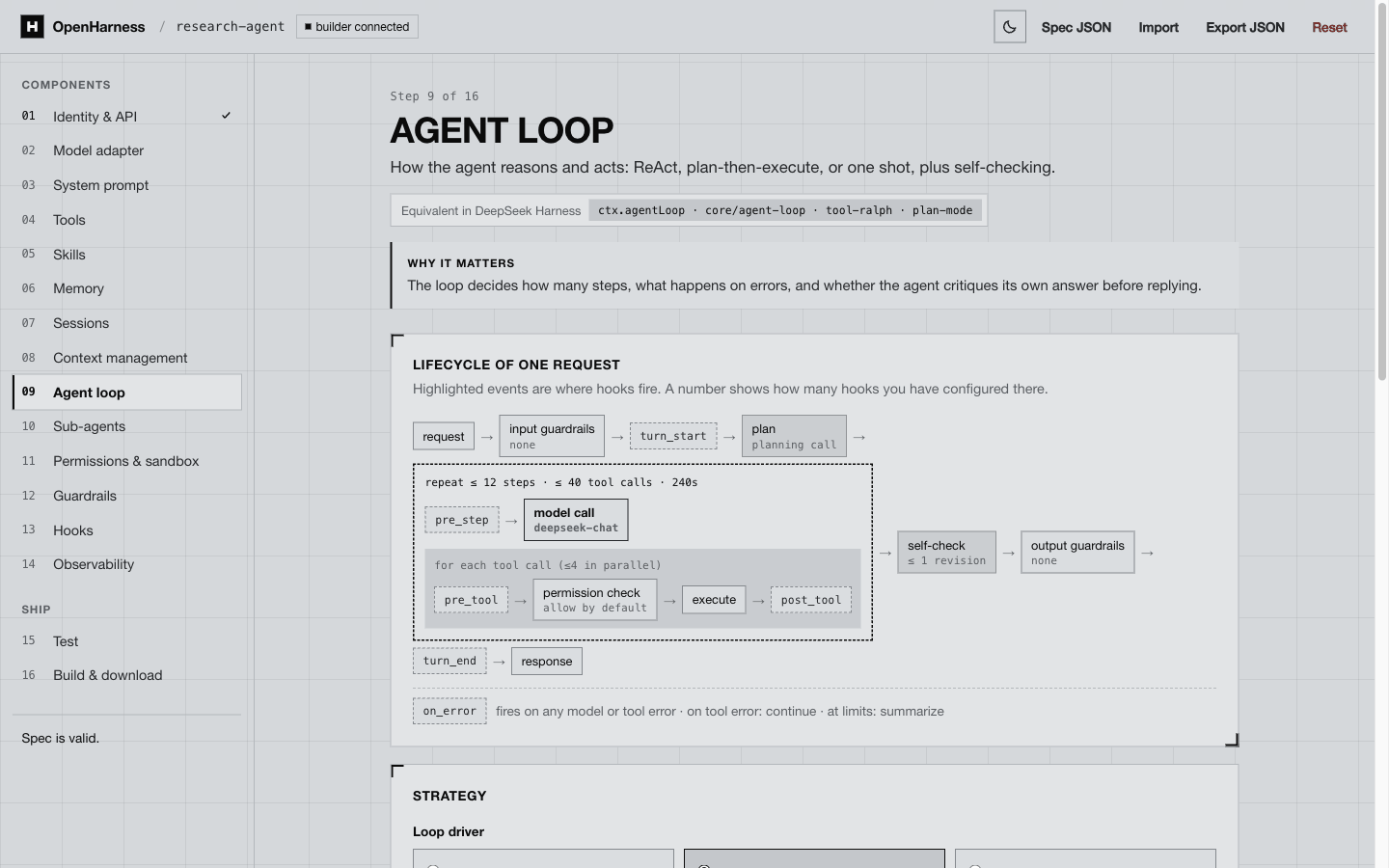
Each step in the builder shows its DeepSeek equivalent and a one-line “why it matters”. The UI doubles as documentation for the research.
The spec is the product
DeepSeek composes plugins through layered patch files: profile, then bundles,
then a home patch, then --patch overlays. That’s powerful, and it’s the wrong
shape for a form. OpenHarness collapses it into one declarative JSON document.
Every field in the UI is a path into it, model.temperature or
loop.selfCheck.maxRevisions, and nothing else exists.
Three rules kept it honest:
Defaults are layered under whatever you send. spec.Parse decodes your JSON
on top of spec.Default(), so {"name": "x", "loop": {"maxSteps": 3}} is a
complete, valid agent. Imports, presets and the --spec flag all go through the
same path.
Validation returns every problem, not the first. Validate() returns a list
like loop.maxSteps: must be >= 1, model.baseUrl: required and so on. The UI
maps each prefix back to its step, so the sidebar shows an error badge on the
right component and the Build step links straight to it.
One set of Go types everywhere. The builder server, the preview, the
compiled binary and the validation all use spec.Spec. The UI is the only
consumer that isn’t Go, and it works from the same JSON and the same catalog
endpoint.
The runtime
The runtime is the part that actually runs agents, and the same code serves the browser preview and the downloaded binary.
One loop, three strategies
The default is a ReAct loop: call the model, run any tools it asks for, feed the
results back, repeat. Plan-then-execute adds a planning call with no tools.
Single shot removes the loop entirely and turns the harness into a smart
proxy. Self-check wraps any of them with a review pass that either replies
APPROVED or returns a corrected answer, up to maxRevisions times.
One detail took two tries. The plan goes in as a system message, and at first I appended it after the user’s request. That left every model call ending on the harness’s own note instead of on what the user asked. It now goes just before the latest user message, so the request stays last.
Every loop has three budgets: steps, total tool calls and wall-clock time. When one runs out, the agent either makes a final no-tools call (“reply with your best answer and say what’s unfinished”) or returns an error, whichever you chose.
Tools are a pipeline, not a function call
Every tool call goes through the same stages, in order:
- look up the tool
- check permissions (tool name, then group such as
mcp:github, then the default) - run
pre_toolhooks, which can veto the call - execute it with a timeout
- truncate the result, keeping head and tail with a marker in between
- run
post_toolhooks
Built-in tools, HTTP tools, MCP tools, skills, memory and sub-agents all look
the same to the loop. The only differences are where Run comes from and which
permission group they’re in.
The tools a client sends in its OpenAI request (tools: [...]) pass
through. If the model calls one, the turn ends with finish_reason: tool_calls and the client runs it, exactly like the OpenAI API. That’s what
lets LangChain’s bind_tools work against a harness that also has its own
server-side tools.
Streaming has two channels
OpenAI chunks carry content. The harness also streams agent activity:
plans, tool calls and results, compaction, self-check verdicts. It sends these
as reasoning_content, the field reasoning models already use, so clients that
don’t know about it simply ignore it.
Streaming the answer token by token is only safe when nothing will change it afterwards. With self-check on, or any output guardrail that can redact or block, the answer is buffered and sent once it’s final. Otherwise a draft would leak before the review rewrote it, or a phone number would stream out before the redaction matched.
Sessions on a stateless API
The OpenAI API is stateless: clients resend the whole transcript every time.
That’s the default here too. In server mode the harness keeps an
append-only JSONL log per session (from an X-Session-Id header or the user
field), so clients can send just the new message, and internal tool calls
survive between turns.
The hard part is that clients don’t tell you which kind they are. The rule that works: compare the incoming user messages against the stored ones. If the stored history is a prefix, the client sent the full transcript and only the tail is new. Otherwise everything is new.
The QA fixtures (more below) found the hole in that rule. A client that sends only the latest message and says “continue” twice looked like a re-sent transcript, and the second “continue” was silently dropped. The fix: a lone user message with no assistant messages is always new.
Context: prune before you summarise
Two mechanisms, applied before every model call:
Pruning: tool results older than the last N are cut to a few thousand characters. That’s cheap and often enough on its own.
Compaction, when the estimated size crosses a ratio of the budget, has two modes:
- sliding window: drop the oldest messages behind a note;
- summarise: make one extra model call to condense them.
The cut never lands between an assistant’s tool call and its results. If the summary call fails, it falls back to the sliding window instead of failing the turn.
Two providers, one message type
Internally there’s one Message type that round-trips the OpenAI wire format,
including multimodal content arrays. The Anthropic adapter converts at the edge:
- system messages are hoisted into
system; - tool calls become
tool_useblocks, and tool results become usertool_resultblocks; - consecutive same-role turns are merged;
- a conversation that starts with the assistant gets a placeholder user turn.
Fallbacks can cross providers. If the DeepSeek primary keeps returning 500s after its retries, a Claude fallback answers, and the client never knows.
Compiling a spec into a binary
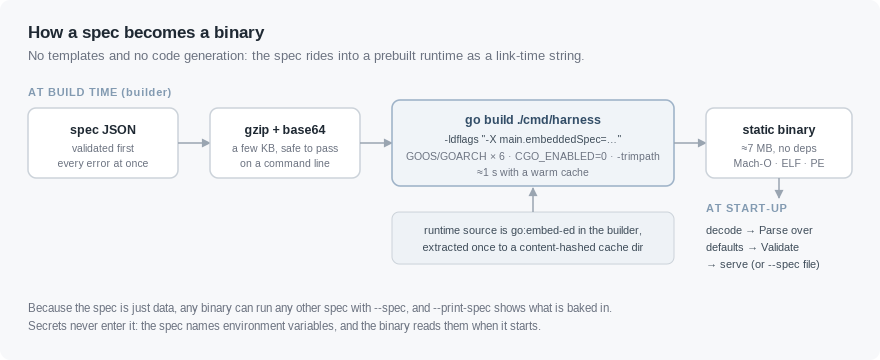
My first idea was code generation: render a main.go per agent. It’s the wrong
abstraction. The runtime is fixed; only the data changes. So the spec rides
into a prebuilt runtime as a link-time string:
go build -trimpath \
  -ldflags "-s -w -X main.embeddedSpec=<gzip+base64 of the spec>" \
  -o research-agent-linux-amd64 ./cmd/harness
At start-up, the binary decodes embeddedSpec, layers it over the defaults,
validates it and serves. --spec file.json replaces it, --print-spec shows it,
and --check validates it without starting.
Two details make this fast and portable:
- The builder embeds the runtime’s own source (
//go:embed go.mod spec/*.go runtime/*.go cmd/harness/*.go). On first use it extracts the source to a directory named after a hash of its contents. That keeps paths stable, so Go’s build cache stays warm: a build takes about a second, and only the link step differs between agents. CGO_ENABLED=0plusGOOS/GOARCHgives six static targets from one machine: macOS on Apple Silicon and Intel, Linux x86-64 and ARM64, and Windows x64 and ARM64. Each is about 7 MB and needs nothing installed.
Secrets never enter the binary. The spec stores the name of an environment
variable (DEEPSEEK_API_KEY), and the binary reads the value when it starts.
HTTP tool headers work the same way: Authorization: Bearer ${CRM_TOKEN} is
expanded at call time.
The Docker option
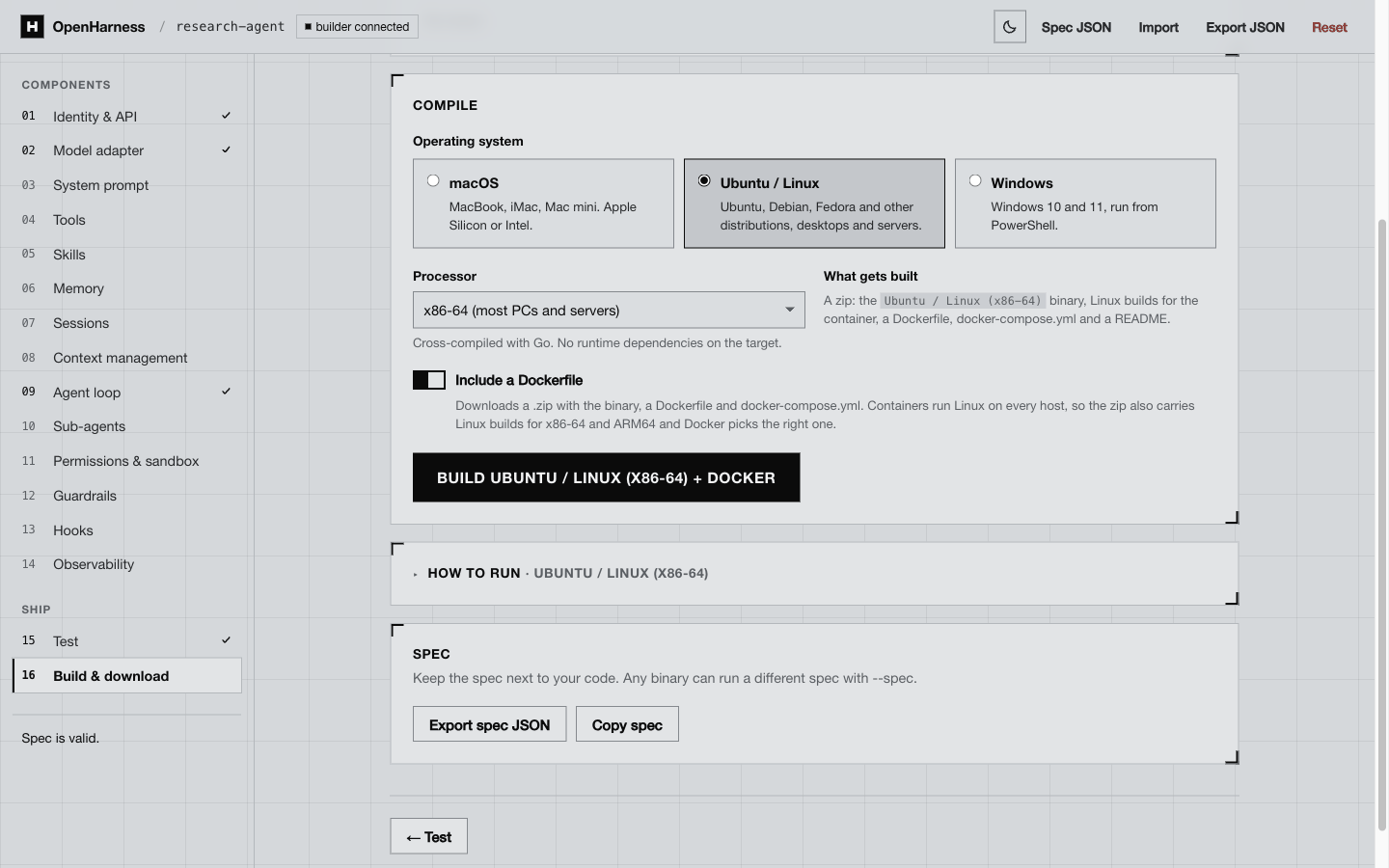
Turn on Include a Dockerfile and the download becomes a zip. The catch is that containers run Linux even on a Mac or a Windows machine, so a Windows binary is useless in an image. The zip contains:
- the native binary you picked;
- both Linux builds (
docker/linux-amd64/agentanddocker/linux-arm64/agent); - a Dockerfile that picks between them with BuildKit’s
TARGETARCH:
ARG TARGETARCH
COPY --chmod=0755 docker/linux-${TARGETARCH}/agent /usr/local/bin/agent
The base image depends on what the agent does:
- Tool-free agents get
distroless/static, with no shell and no package manager. - Agents that run programs (the shell tool or stdio MCP servers) get Debian
with the packages their allow-list needs:
git,golang-go,npm,python3-pytest, and so on. Commands it can’t map get a# TODO: installcomment rather than a silent failure.
A distroless image has no curl, so health checks call the binary itself:
agent --healthcheck. --chmod matters on Windows, where unzipping loses the
executable bit.
Letting strangers run agents on my server
The Test step runs the agent you configured, live, inside the builder process. Locally, that’s just convenient. On a public site it means running a stranger’s configuration on my server.
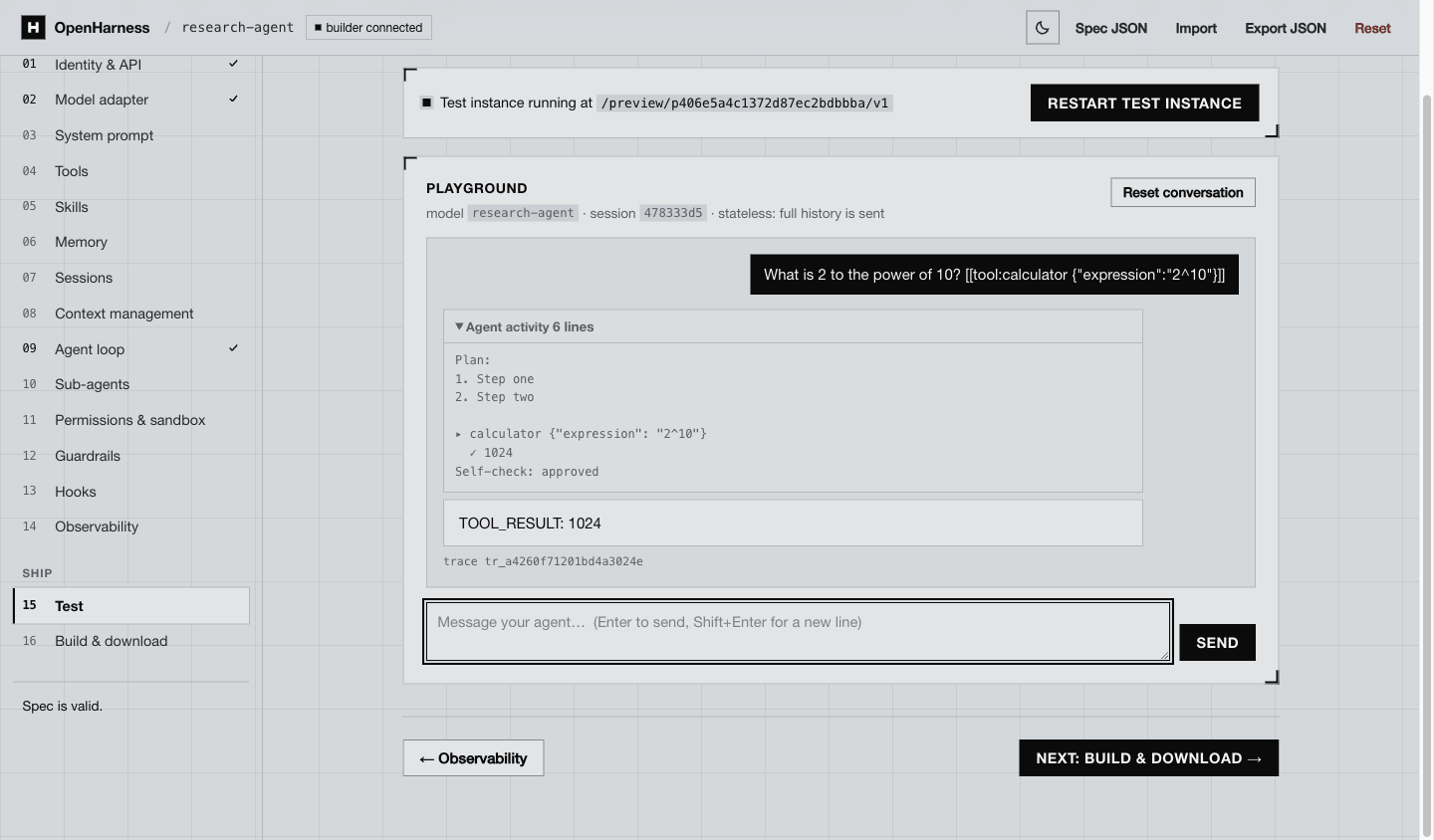
(The model in this screenshot is the scripted mock from the test fixtures,
hence TOOL_RESULT: 1024. The plan, tool call and self-check lines are the real
activity stream.)
The obvious risks are the shell tool and stdio MCP servers, which are literally
“run this program”. The non-obvious one was worse. While I was designing public
mode, I noticed the spec decides which environment variables get read. Set
model.apiKeyEnv to the name of any secret on the server, point baseUrl at a
URL you control, and the “API key” arrives in your logs. HTTP tool headers with
${VAR} had the same problem.
Public mode (--public, the default in the image) closes each risk at its
source:
| Risk | Mitigation |
|---|---|
| Spec reads server secrets | Env lookups go through runtime.LookupEnv, which returns "" in public mode. Visitors paste their own key, held in memory for that test instance only. |
| Running programs | shell and stdio MCP servers are removed from previews, with a note telling the visitor. The downloaded binary keeps them. |
| SSRF into the internal network | Every outbound connection is checked after DNS resolution. Loopback, private, link-local, CGNAT and multicast addresses are refused. |
| Writing files anywhere | Workspace, memory, sessions and traces are moved into a per-preview temp dir, deleted when it ends. |
| Abuse | Per-IP token buckets for builds, previews and messages; 2 previews per visitor; 30-minute idle expiry. |
The SSRF guard is short, and the important part is where it sits: on the
dialer’s Control hook, which receives the address already resolved:
func guardControl(_, address string, _ syscall.RawConn) error {
    host, _, _ := net.SplitHostPort(address)
    ip := net.ParseIP(host)
    if ip == nil || !publicIP(ip) {
        return fmt.Errorf("%w: %s", errBlockedAddr, host)
    }
    return nil
}
Checking the hostname before resolving it is useless, because any public name
can resolve to 127.0.0.1. Checking the connected address covers DNS rebinding
for free.
The rate limiter keys on the client IP, which behind a proxy means trusting
X-Forwarded-For. It reads the last hop, the one my own proxy appended,
and only when the proxy is trusted. Otherwise anyone could rotate a fake header
and get unlimited builds.
Deploying on Coolify
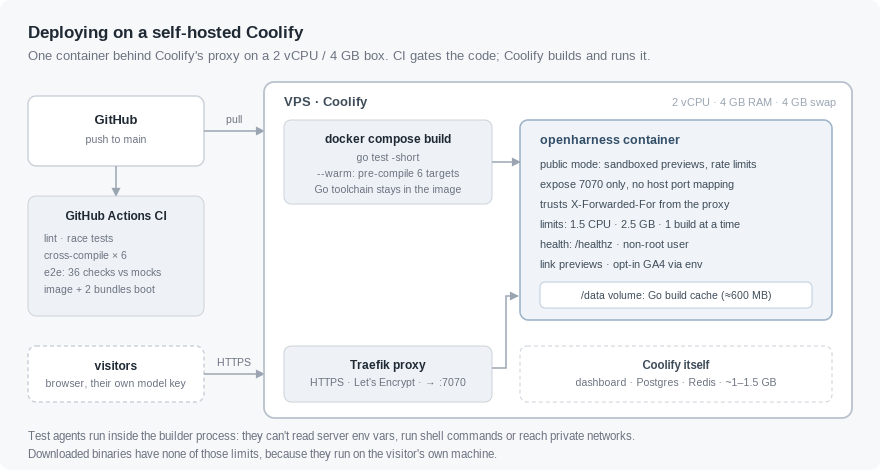
The site runs on a small VPS with a self-hosted Coolify:
2 vCPUs, 4 GB of RAM, plus 4 GB of swap. Vercel and Cloudflare were never options.
Every download is a go build, so the server needs the Go toolchain at runtime,
seconds of CPU per request, a warm build cache on disk, and a long-lived process
for previews. That’s a container, not a function.
One container, not two. The UI is go:embed-ed into the builder binary, so
the frontend and backend deploy as a single Docker Compose service. The image is
golang:1.26-bookworm, kept on purpose so the toolchain is there at runtime.
It runs as a non-root user, and a Docker volume at /data holds the build cache.
expose, not ports. My first compose file had ports: "7070:7070". On
Coolify that publishes the app straight on the host, bypassing the HTTPS proxy.
Plain HTTP would work on <server-ip>:7070, and because the rate limiter
trusts X-Forwarded-For from the proxy, anyone hitting the port directly could
forge their IP. The production compose file uses expose: ["7070"], so the
proxy is the only way in. A separate docker-compose.local.yml adds a
localhost-only port for running it on a laptop.
Size limits to the box. The first compose file asked for 3 CPUs. On a 2-CPU host, Docker refuses to start a container whose CPU limit is higher than the host has, so the deploy would have built fine and then failed to start. The limits are now:
- 1.5 CPUs and 2.5 GB for the container, leaving Coolify’s own services about 1.5 GB;
- one build at a time (
OPENHARNESS_BUILD_CONCURRENCY=1); - 4 GB of swap, for the one-off spike when the image is built.
Pre-warm the cache in the image. The Dockerfile ends with
RUN openharness --warm, which compiles the runtime for all six targets once.
When Coolify mounts a fresh named volume at /data, Docker seeds it with that
content, so the first visitor’s build takes a second instead of six.
A few Coolify specifics I learnt along the way:
- Domain: in the domain dialog, the Port field is the container port
(
7070). The public URL stays plainhttps://…. - Volumes: with the Docker Compose build pack, volumes and health checks come from the compose file and the Dockerfile. Coolify shows the volume as read-only, and there is no Healthcheck tab.
- Environment variables set in Coolify’s UI reach the container only if the
compose file references them. Settings like
OPENHARNESS_GA_ID(opt-in Google Analytics) are declared as${OPENHARNESS_GA_ID:-}, which is empty unless you set it. - Reload Compose File after changing it, or Coolify keeps using its stored copy.
Link previews need the real domain. Sharing the link on WhatsApp showed
nothing at first, because the page had no Open Graph tags. Those need an
absolute image URL, which isn’t known when the image is built. The server now
renders index.html per request, taking the domain from
OPENHARNESS_PUBLIC_URL, or else from the proxy’s X-Forwarded-Proto and
X-Forwarded-Host. It validates the host before using it, so a forged Host
header can’t inject markup.
Testing it
The QA plan is 345 written test cases across 27 areas:
- every spec parameter;
- all six export targets and the Docker bundle;
- OpenAI SDK compatibility;
- public-mode security;
- the deployment itself.
But most agent behaviour can’t be tested reliably against a real model. You can’t make GPT fail exactly once to test retries.
So the repository includes a scriptable mock LLM: about 350 lines of standard-library Python. It speaks both the OpenAI and Anthropic APIs, with streaming. Its behaviour is driven by directives in the user message:
[[tool:calculator {"expression":"2^10"}]]   call a tool, then report the result
[[fail-once:500]] [[say:ok]]                fail the first request, then answer (retries)
[[echo-system]]                             reply with the system prompt it received
[[subagent:mathwhiz]]                       delegate to a sub-agent
Model names like fail-500-primary always fail, which tests fallback chains.
A webhook server stands in for hooks, approvals, HTTP tools and MCP over HTTP,
and an 80-line stdio MCP server completes the set. With those, every case in
the plan has an exact expected output.
Writing the expected results found four real bugs before any tester did:
- Sessions: the repeated “continue” bug above.
- Hooks:
turn_starthook injections went into the same list as the client’s system messages, so they obeyed the client’s policy. Withignorethey vanished; withreplacethey wiped out the base prompt. They now get their own prompt section. - PII redaction: it redacted
3.14159265358979as a card number and swallowed the space after real ones. Cards now need a valid Luhn checksum, phone numbers need a+or separators, and decimals are skipped. - Traces: they logged an empty model name, so after a fallback you couldn’t tell which model had answered.
36 of those cases run automatically as qa/ci_smoke.py: a real agent binary
against the fixtures, in about ten seconds. GitHub Actions runs it on every
push, alongside race-enabled unit tests and cross-compilation of both binaries
for all six targets. A Docker job builds the production image, starts it in
public mode, exports a distroless bundle and a Debian bundle through the live
API, builds both, and checks they come up healthy. That job is the only place
the full chain from spec to running container is exercised end to end.
How it was built
I built it over two days, pairing with Claude Code. The order of the work mattered more than the tooling:
- Research first. The 14 components came from mapping DeepSeek’s seams, not from guessing. The research doc is in the repo, along with what I deliberately did differently.
- The spec before anything else. Once
spec.Specexisted, the UI and the runtime could be built in parallel against it, and they were. - Run the real thing early. The first compiled binary served
/v1/modelswithin the first few hours. Everything after was building out a pipeline that already worked end to end. - Let the tests find the bugs. Each of the bugs above was found by writing a precise expected result and then running it, not by reading code.
The stack
- Runtime and builder: Go 1.26, standard library only.
net/httprouting,log/slog,embed,archive/zip; no OpenAI or Anthropic SDK. - UI: plain HTML, CSS and ES modules, embedded in the binary. Light and dark themes, keyboard-accessible, works on a phone.
- QA: Python 3 standard library only. CI is GitHub Actions; deployment is Docker Compose on a self-hosted Coolify.
What it doesn’t do (yet)
- Previews are in-process. File tools are jailed to a temp directory, but that’s a path check, not a VM. The stronger design is a microVM per preview, with the builder as a router.
- No agent teams, scheduling or code mode. DeepSeek has seams for shared
task boards (
ctx.agentTeams), cron-style triggers (ctx.schedule) and a mode where the model writes code that calls tools (ctx.ptcRuntime). None of them are components here yet. - Approvals are webhooks. An HTTP API has no human to click Approve. A webhook that decides (and fails closed) is the honest equivalent, but it’s less friendly than a prompt.
- MCP auth is headers only. No OAuth flows for remote MCP servers.
Five things worth knowing
In rough order of how surprising they were:
- “Everything is a plugin” becomes “everything is a field”. For a builder, one declarative document with good defaults beats a plugin graph. The graph still exists; it’s just compiled in.
- Configuration is an attack surface. The most dangerous bug in this project wasn’t in the code that runs tools. It was that a config field could name a secret.
- Check addresses after DNS, not names before it. Any SSRF check that runs before resolution is decoration.
- A link-time string is a perfectly good packaging format. No codegen, no templates, and builds in about a second.
- Write the expected output before you run the test. Four of the bugs above were found by writing down what should happen, not by running anything.
The code is on GitHub: FirePing32/OpenHarness, MIT licensed. Try it at openharness.prakhargurunani.com: build an agent, download it, and point your favourite OpenAI client at it.
If you find a component that should exist and doesn’t, or a place where the reasoning above is wrong, open an issue.